WhatsApp Auto Reply for Personal Trainers in Singapore
WhatsApp Auto Reply for Personal Trainers in Singapore
Every freelance PT in Singapore has lost a client to this scenario: your phone lights up while you're spotting a 120kg deadlift, and by the time the session ends, the enquiry has gone cold. This guide is for solo personal trainers running 15–25 sessions a week who want a simple, free system to capture every enquiry — without hiring anyone or paying for enterprise software. You'll learn the exact WhatsApp Business setup, what to write in your messages, PDPA basics you can't skip, and when it makes sense to upgrade.
Why Freelance PTs Miss More Enquiries Than Any Other Business
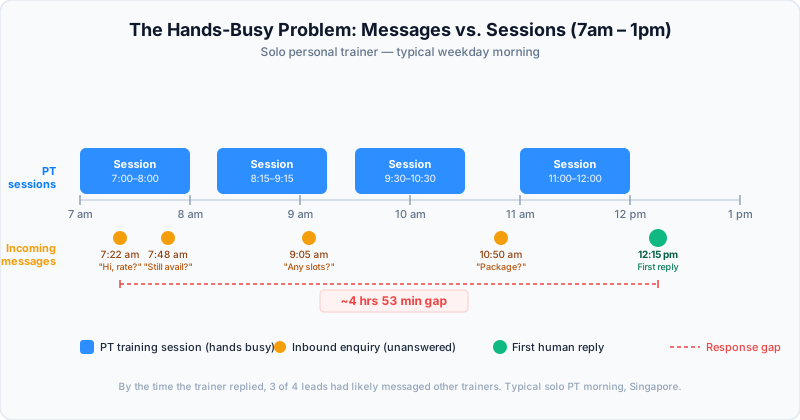
The standard advice — "just reply faster" — misses the point entirely. A freelance PT is physically occupied during the hours clients are most likely to reach out. A 7am client finishes at 8am; you have three more sessions before noon. When a potential client messages at 9am asking about rates, you cannot reply until 12:30pm. By then, they've already messaged two other trainers.
This is the hands-busy problem: you are simultaneously the service provider and the customer service team, and those two roles conflict during your peak earning hours. Enterprise WhatsApp automation guides — like the ones published for teams using SleekFlow — assume someone at a desk can monitor a chat dashboard. That doesn't apply to a solo operator holding a barbell.
The fix isn't expensive software. It's a 30-minute setup that makes WhatsApp Business do the replying while you do the training.
Free WhatsApp Business Setup: Greeting, Away Message, and Quick Replies
The WhatsApp Business app — the free native app, not the paid API — covers 80% of the problem before you spend a cent.
Step 1: Enable a Greeting Message
This fires automatically when someone messages you for the first time (or after 14 days of inactivity). Write it like a person, not a system:
"Hi! Thanks for reaching out. I'm [Name], a certified PT based in [area]. I'm usually training between 7am–1pm, so if you don't hear back immediately, that's why. I'll reply personally as soon as I'm free — usually within 2 hours. In the meantime, feel free to share: what are your goals and when are you looking to start?"
This sets a reply-time expectation, starts collecting pre-qualification info, and sounds like a human.
Step 2: Set an Away Message for Session Hours
Navigate to Business Tools → Away Message and schedule it for your core training window (e.g., 6:30am–1:30pm weekdays). Sample:
"I'm currently with a client and will reply by [time]. For quick info on pricing or availability, reply RATES or AVAIL and I'll send the details straight away."
The keyword prompt ("reply RATES") lets clients self-serve while you're busy — pair it with a quick reply shortcut.
Step 3: Build 5 Quick Reply Shortcuts
Quick replies are pre-saved messages you send by typing / in any chat. Every PT should have these five saved:
| Shortcut | What to include |
|---|---|
/rates |
Session rates, package options, expiry terms |
/avail |
Link to booking calendar or current available slots |
/location |
Your studio address, operating areas, or park location |
/trial |
Trial session offer and how to book |
/pay |
PayNow/PayLah! UEN or QR code + payment instructions |
A Pasir Ris-based PT running 6am bootcamps, for example, can fire /location in two seconds — sending a pre-formatted message with the park entrance, nearest parking, and what to bring — without typing a word.
What to Write: Singapore-Specific Tone and Templates
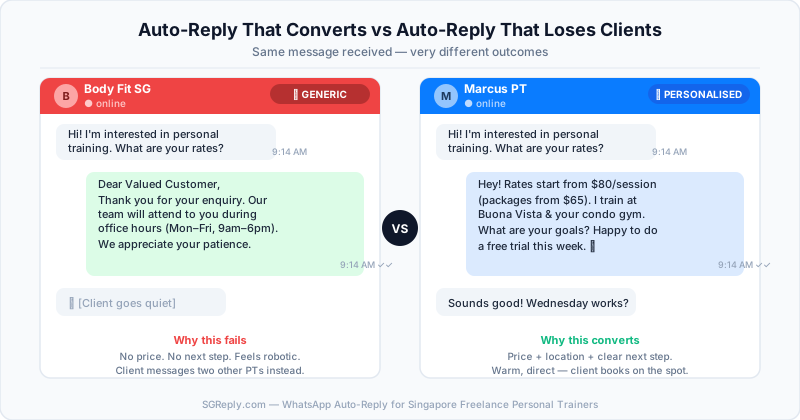
The fastest way to lose a warm lead is to sound like a front desk. Clients hiring a personal trainer are making a personal decision — they're trusting someone with their body, their schedule, and sometimes their medical history. A message that reads like it came from a ticketing system kills that trust before the conversation starts.
Avoid: "Your enquiry has been received. Our team will respond within 2 business days."
Use instead: "Hey! I'm mid-session right now — back to you by 1pm. Quick question to get us started: are you training for a specific goal, or more general fitness?"
For Singapore public holiday away messages, be specific. Don't leave your default away message running on Chinese New Year. Update it the day before:
"Happy CNY! I'm taking [dates] off and back to normal schedule on [date]. Drop me a message and I'll reply then — have a great holiday!"
For PayNow booking confirmation, keep it clean and actionable:
"Payment received — thank you! See you [date] at [time] at [location]. Reply CONFIRM to lock in the slot. Any questions before then, just ask."
Singapore clients respond to messages that are warm but get to the point. One or two sentences with a clear next step outperforms a paragraph of pleasantries every time — especially when someone is deciding between you and two other trainers they messaged at the same time.
PDPA Compliance: What You Must Tell Clients on WhatsApp
When a potential client shares their name, contact number, weight, health conditions, and fitness goals over WhatsApp, you are collecting personal data under Singapore's Personal Data Protection Act. As a freelance PT — even one operating from home under the URA Home-Based Business Scheme — you are legally an organisation under PDPA and have obligations around how you collect and store that data.
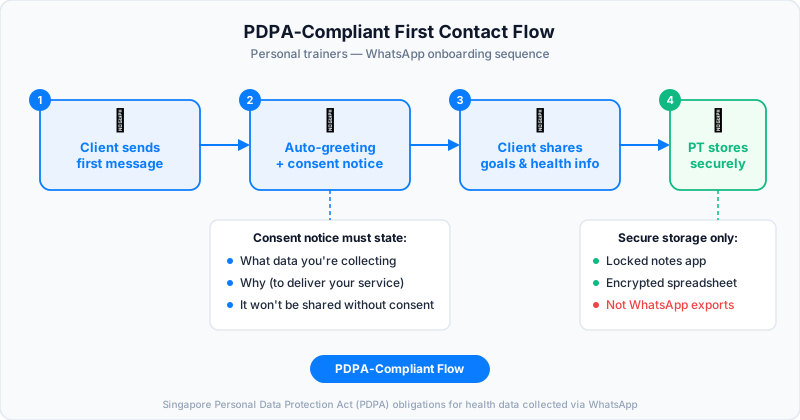
Your greeting message (or an early follow-up before collecting any information) should include a brief consent notice:
"Just a heads up — the info you share here (name, contact, health goals) will be stored securely and used only to manage your training. I won't share it with anyone else. Let me know if you have questions about that."
You need to state three things:
- What data you're collecting
- Why (to deliver your service)
- That it won't be shared without consent
Health information — injury history, medical conditions — is sensitive personal data and warrants extra care. Store it in a locked notes app or an encrypted spreadsheet, not in an unprotected WhatsApp export or a message forwarded to another contact. This obligation carries through to automated replies too — our guide on use cases for AI chatbots covers what PDPA-compliant automated communication looks like in practice.
When to Upgrade Beyond the Free App
The free WhatsApp Business app is a solid daily driver, but it has real limits. Consider upgrading when:
- You're still missing messages even with away messages on — usually happens past 20 active clients when response volume outpaces manual follow-up
- You need an automated booking sequence: pick a slot → confirm → PayNow link → 24-hour reminder, all without manual steps
- You want to connect WhatsApp to a calendar or CRM without copy-pasting data
- You're running group programmes and need to broadcast to 20+ clients in a structured sequence
The upgrade path in Singapore typically goes: free WhatsApp Business app → WhatsApp Business API via a local provider → AI-enabled auto-reply. Tools on the IMDA SMEs Go Digital pre-approved list may qualify for Productivity Solutions Grant support — check SG Reply's pricing to see whether your setup fits. For more on what this looks like in practice, read our guide on scaling with AI.
How SG Reply Handles This
SG Reply is an AI auto-reply tool built for Singapore small businesses, including solo service providers. It connects to the WhatsApp Business API and handles multi-step enquiry flows — rates, availability, booking confirmation, and PayNow follow-up — without you needing to touch your phone mid-session. Unlike enterprise platforms priced for teams, SG Reply is designed for operators running under 30 active client conversations a week. Try the live demo to see how it handles a PT enquiry from first message through to booking confirmation.
Frequently Asked Questions
Can I use WhatsApp auto reply on my personal number as a freelance PT, or do I need a separate business number?
You can install the free WhatsApp Business app on your existing personal number — it replaces the standard WhatsApp app on that number. Most PTs eventually move to a separate SIM or eSIM for the business number so personal and client conversations don't mix. If you plan to upgrade to the WhatsApp Business API in future, you'll need a dedicated number that has never been registered on WhatsApp before.
What should I write in a WhatsApp away message as a personal trainer in Singapore without sounding unprofessional?
Be specific about why you're unavailable and honest about your reply window. "I'm currently with a client and will reply by 1pm" is more reassuring than a vague out-of-office — and it signals that you take sessions seriously. Invite the person to share their goal or ask a specific question so the conversation has already started when you return. Drop any corporate phrasing; "your enquiry is important to us" reads like a call centre, not a trainer someone would trust with their body.
Will clients think I'm ignoring them if I send an auto-reply instead of responding personally?
No — and the logic is straightforward. An immediate auto-reply that says you're with a client is a better signal than silence followed by a delayed personal reply. It tells them you're busy working, not ignoring them. Set a clear time expectation and meet it consistently. Clients who get that combination book; clients who get silence message someone else.
Is there a free WhatsApp bot for personal trainers in Singapore that doesn't require the paid API?
The native WhatsApp Business app is free and requires no API — it gives you greeting messages, away messages, and quick-reply shortcuts, which together function as a simple bot for common enquiries like rates, availability, and PayNow details. It doesn't support branching logic or automated booking sequences, but it handles the majority of first-contact scenarios at zero cost. For multi-step automation you need the API, which requires a third-party provider.
How do I handle booking confirmations, session reminders, and PayNow follow-ups on WhatsApp without spending hours on admin every week?
Start with quick replies: save a /confirm message with session details and your PayNow QR, and a /reminder message you send the evening before each session. This reduces each booking to under a minute of admin. Once you're at 20 or more active clients and the manual steps add up to an hour or more each week, an AI auto-reply tool on the WhatsApp Business API can automate the full sequence — confirmation, payment follow-up, and next-day reminder — triggered by client replies with no manual input required.
Put this into practice with SG Reply
AI-powered WhatsApp auto-replies for Singapore businesses — set up in minutes.
Start free →