Telegram Bot for Tuition Centre Singapore: Owner's Guide
Telegram Bot for Tuition Centre Singapore: Owner's Guide
Singapore families spent S$1.8 billion on private tuition in 2023 and the figure is projected to exceed S$2.14 billion by 2025. More spend means more centres competing for the same families — and if you're running your centre solo, more parent messages piling up on your phone after 9 p.m. This guide covers how to set up a Telegram bot that handles trial bookings, fee questions, and schedule queries on its own, so you can stop answering the same five messages every night.
Why Telegram — Not WhatsApp — Makes Sense for Tuition Centres
Singapore parents are already on Telegram. School announcement groups, parent committee chats, MOE update channels — it's where education communication happens in Singapore. Parents don't need to download anything new or change their habits to message your centre.
Telegram Business, available to any Telegram Premium subscriber, adds features that solve the immediate problem: greeting messages that fire automatically when a parent first contacts you, away messages for after-hours enquiries, and quick replies you can trigger with a slash command. None of this requires a developer or a third-party app.
Compare that with WhatsApp Business API, which requires a verified business account, monthly platform fees, and a technical integration — steep barriers for a one-owner centre.
The Practical Difference for a Centre Owner
A parent messages at 10 p.m. asking about Primary 3 Math slots. Without automation, that sits unread until morning. With Telegram Business, your away message instantly tells the parent which slots are available, sends them your booking link, and lets them know you'll confirm by the next day. The parent has what they need; you reply when you're ready.
The Five Parent Questions Every Tuition Bot Must Handle
Every tuition centre owner I've spoken with fields the same five questions, day after day. These five alone account for most of what's in your chat log right now. Build your bot around them and most enquiries answer themselves.
1. Trial Class Availability
Bot flow: Parent types "trial" or "try class" → bot replies with available slots for the current week, a Google Form link to reserve a spot, and the trial class fee if applicable.
2. Current Term Fees and Payment Methods
Bot flow: Keyword "fees" or "payment" → bot sends a text card with the term fee for each subject and level, accepted payment methods (PayNow UEN, bank transfer, cash), and the payment deadline for the current term.
3. Class Schedule and Subject Offerings
Bot flow: Keyword "schedule" or "timetable" → bot pulls from a linked Google Sheet and returns the weekly timetable for each subject. You update one spreadsheet; the bot always shows the latest version.
4. Makeup Lesson Policy
Bot flow: "Makeup" or "absent" → bot explains the centre's makeup class policy, lists upcoming available makeup slots, and prompts the parent to confirm via a quick reply button.
5. Teacher Qualifications
Bot flow: "Teacher" or "tutor" → bot returns a short bio card for each subject teacher, including qualifications and years of experience — the trust signal parents consistently ask for before enrolling.
A Primary 5 English centre in Tampines can configure all five flows in a single afternoon. Every parent enquiry about holiday intensive programmes gets an instant reply; the owner steps in only for genuinely unusual situations.
No-Code Setup: Telegram Business + a Free Bot Builder
You do not need a developer. Here is a weekend-achievable setup:
Step 1 — Enable Telegram Business. Subscribe to Telegram Premium, go to Settings → Telegram Business, and enable greeting messages and away messages. Write your default greeting including your centre name, subjects offered, and a prompt to type a keyword like "fees" or "trial".
Step 2 — Create your bot with BotFather. Open Telegram, search @BotFather, type /newbot, and follow the prompts. You will receive a bot token — save it.
Step 3 — Connect a no-code bot builder. Platforms like BotHelp or ManyChat (both have free tiers) let you build keyword-triggered conversation flows visually. Connect your bot token, then build one flow per question category above.
Step 4 — Link a Google Sheet for live schedule data. Use the Google Sheets integration in your chosen builder to pull class schedule data dynamically. Update the sheet when the schedule changes; the bot response updates automatically.
Step 5 — Test with a personal account. Message your bot from a personal Telegram account and walk through each keyword flow before going live.
The same keyword-trigger logic works across WhatsApp if you run both channels — see our WhatsApp auto-reply guide for how to set that up alongside this.
Using Telegram Broadcasts for Retention and Reminders
A Telegram bot handles inbound queries. A Telegram channel handles outbound announcements. Run both and you cover every direction — parents reaching you, and you reaching parents.
Set up a Telegram channel for your centre and add all enrolled parents. Then schedule regular broadcasts for:
- Homework reminders — Sunday evenings, subject-specific
- Exam tip sheets — two weeks before PSLE or O-Level revision periods
- Term-break schedule changes — at least two weeks' notice
- Fee payment reminders — five days before the term payment deadline
A secondary tuition centre in Jurong West using this approach saw a 40% drop in inbound "what is the homework?" messages within three weeks of launching the broadcast channel. Parents who follow the channel regularly tend to ask about adding subjects at the next enrolment window — they're already familiar with the centre's teaching style before that conversation even starts.
How to Use the PSG Grant for a Tuition Centre Chatbot
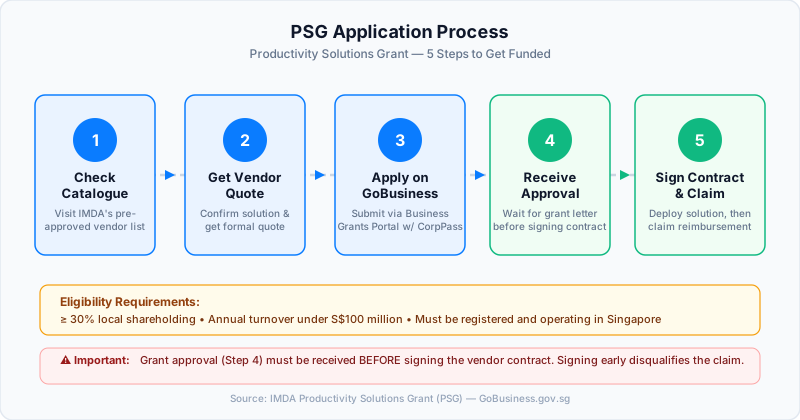
If your centre is registered as a Singapore SME, the Productivity Solutions Grant covers up to 50% of the cost of an approved AI chatbot platform.
IMDA data shows SME AI adoption tripled from 4.2% to 14.5% in 2024, with businesses reporting average cost savings of 52% after adopting AI tools. The grant exists because the government wants education businesses like yours to act now — not after every competitor has already automated their admin.
Steps to apply:
- Check the IMDA CTO-as-a-Service catalogue for pre-approved chatbot vendors.
- Select a vendor whose solution covers parent inquiry automation and appointment booking.
- Get a vendor quote before applying.
- Submit your application via the Business Grants Portal at GoBusiness.gov.sg using CorpPass.
- Receive grant approval before signing the vendor contract — approval must come first.
Your centre must have at least 30% local shareholding and annual turnover under S$100 million to qualify. If you want to see what else is possible beyond parent enquiries, our AI chatbot use cases guide for Singapore businesses covers the broader options.
How SG Reply Handles This
SG Reply connects to Telegram and WhatsApp and automatically answers the parent questions your centre receives every day — trial class availability, fees, schedules, and makeup policy — using the information you provide as the source of truth, not a generic AI trying to guess at your policies. Setup takes under an hour with no developer required. You can try the live demo to see how it handles a real parent enquiry, or check SG Reply's pricing to find the right plan for your centre.
Frequently Asked Questions
How do I set up a Telegram bot for my tuition centre in Singapore without coding?
Enable Telegram Business via your Telegram Premium settings to unlock greeting and away messages. Then create a bot using @BotFather in Telegram and connect it to a no-code builder like BotHelp or ManyChat, which let you build keyword-triggered reply flows visually. A basic five-flow setup covering your most common parent questions takes a single weekend to get live.
Can a Telegram bot handle trial class bookings and collect parent contact details automatically?
Yes. Configure a keyword trigger — such as "trial" or "book" — that sends available slot options and a Google Form link for the parent to submit their child's name, level, and preferred time. Responses go directly to a Google Sheet you control, giving you a complete enquiry log without manually capturing any details.
Is my tuition centre eligible for the PSG grant to pay for a Telegram chatbot?
Check two conditions: your centre must be registered as a Singapore SME with at least 30% local shareholding and annual turnover under S$100 million. If you meet both, the Productivity Solutions Grant covers up to 50% of the cost of a pre-approved AI chatbot platform. Apply via the Business Grants Portal before signing any vendor contract — grant approval must come first.
What should my tuition centre Telegram bot say when a parent asks about fees or class schedules?
For fees, the bot should state the term fee per subject and level, the accepted payment methods (PayNow UEN, bank transfer, cash), and the current term's payment deadline. For schedules, return the weekly timetable — pulled live from a Google Sheet so parents always see the current version. End each reply with a prompt so the parent knows what to ask next.
How is a Telegram bot different from just using a Telegram group to communicate with parents?
A Telegram group is a many-to-many chat where every parent sees every message — it gets noisy fast and requires you to manage the conversation constantly. A bot is a private, one-to-one automated assistant that answers each parent individually, around the clock, without you needing to be online. Bots also respond to specific keywords, so parents get accurate, consistent answers instead of scrolling through group chat history.
Put this into practice with SG Reply
AI-powered WhatsApp auto-replies for Singapore businesses — set up in minutes.
Start free →